

Calculate the number of notes or coins needed for any amount.
A denomination calculator helps you determine how many notes or coins are needed to make a specific total amount. By entering the total, available denominations, and optional quantity limits, you can quickly calculate a practical cash breakdown.
Managing cash becomes much easier when you know exactly how many notes or coins are needed to make a particular amount. Whether you are preparing cash for a business, organizing a cash drawer, planning payments, or simply checking different combinations of currency denominations, a denomination calculator can make the process faster and more convenient.
A denomination refers to the stated value of a banknote or coin. For example, a currency may have notes or coins with values such as 10, 20, 50, 100, 500, or 1,000. Different countries use different denominations, and the available values can change over time.
Our denomination calculator allows you to enter a total amount, choose a currency, and add the available denominations. The calculator then determines how many notes or coins are needed to make the entered amount using the available denominations.
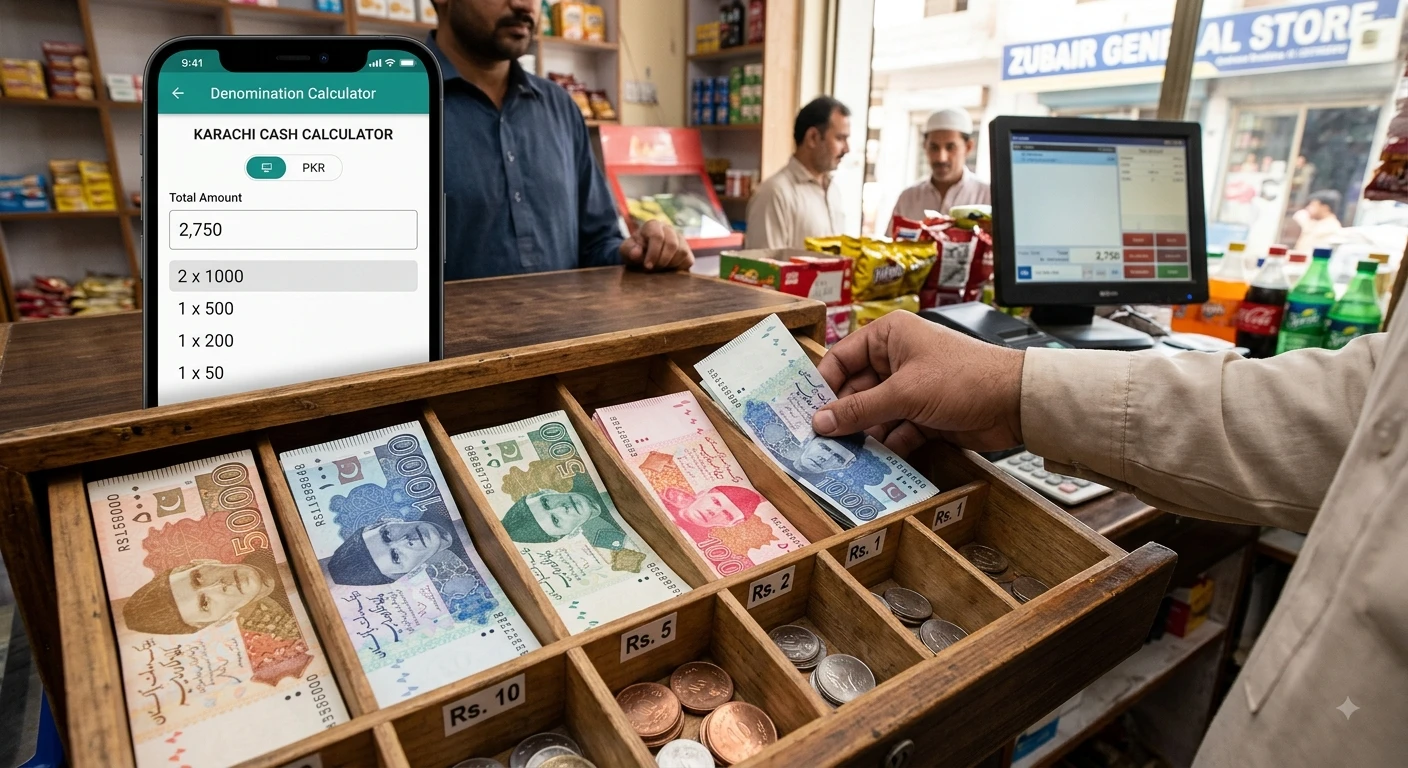
A denomination is the face value assigned to a particular unit of currency.
For example, if a bank issues notes with values of 10, 20, 50, and 100, each value represents a different denomination.
Denominations are used for both coins and banknotes. The exact denominations available depend on the currency and the issuing authority.
For example, the U.S. Currency Education Program states that current U.S. Federal Reserve notes are issued in denominations of $1, $2, $5, $10, $20, $50, and $100.
The Bank of England similarly lists £5, £10, £20, and £50 as its current circulating banknote denominations.
This demonstrates why a denomination calculator needs to allow users to enter their own available denominations.
A denomination calculator is a tool that helps determine how many notes or coins of different values can be used to make a specified total amount.
For example, suppose you need to make:
Rs. 2,000
and your available denominations are
The calculator can determine a combination of these denominations that adds up to Rs. 2,000.
One possible combination is
The total is
1,000 + 500 + 400 + 100 = Rs. 2,000
The calculator makes this type of calculation easier without requiring you to test different combinations manually.
The calculator starts with the total amount you enter.
You then provide the available denominations. The calculator sorts the denominations from the largest value to the smallest value and attempts to use the larger denominations first.
For example, suppose the total is
Rs. 3,750
and the available denominations are
The calculator can work through the denominations and determine how many of each are required.
The basic relationship is
Total Amount = Σ (Denomination × Quantity)
For example:
3,750 = (3 × 1,000) + (1 × 500) + (1 × 200) + (1 × 50)
So the required cash would contain:
The quantities and combination depend on the denominations entered into the calculator.
Using the calculator is straightforward.
Enter the amount you want to make.
For example:
5000
Make sure the amount is positive and uses the appropriate decimal format for the selected currency.
Choose the currency you are working with.
The calculator can be configured for currencies such as
You can also select an alternative currency option when necessary.
The currency selection primarily controls how the result is displayed. It does not automatically convert one currency into another.
Inheritance Portion Calculator
Enter the notes or coins that are available.
For example:
5000, 1000, 500, 200, 100, 50, 20, 10
You can add additional denominations when required.
If you have only a limited number of a particular denomination, you can enter a maximum quantity.
For example, suppose you have only three Rs. 500 notes available.
You can set:
Denomination: 500
Maximum Quantity: 3
The calculator will then avoid using more than the specified quantity.
If there is no limit, you can leave the maximum quantity field empty.
After entering the information, select Calculate.
The result shows the denominations used, their quantities, and the subtotal for each denomination.
The calculator also displays the total number of notes or coins used.
Suppose you need to prepare Rs. 5,000 and have these denominations:
A simple combination is
5 × Rs. 1,000 = Rs. 5,000
Therefore, the total is made using:
5 notes of Rs. 1,000
The total number of notes is 5.
This is a particularly simple example because one denomination can make the entire amount.
Consider a total amount of:
Rs. 2,750
Available denominations:
One possible combination is
2 × Rs. 1,000 = Rs. 2,000
1 × Rs. 500 = Rs. 500
1 × Rs. 200 = Rs. 200
1 × Rs. 50 = Rs. 50
Adding them together:
2,000 + 500 + 200 + 50 = Rs. 2,750
The total number of notes is 5
This illustrates how different denominations can be combined to reach a specific amount.
The maximum quantity option is useful when you have a limited supply of a particular denomination.
For example, suppose you need Rs. 4,000, but you have only two Rs. 1,000 notes.
Without a limit, a calculator might use four Rs. 1,000 notes if that denomination is available.
With a maximum quantity of 2, the calculator can use no more than two of those notes and then look at the remaining denominations.
This can be useful for cash preparation because the physical amount of each denomination may be limited.
For example:
| Denomination | Maximum Quantity |
| Rs. 1,000 | 2 |
| Rs. 500 | 4 |
| Rs. 100 | 10 |
| Rs. 50 | 10 |
The calculator uses these limits when determining the combination.
Sometimes the denominations you enter cannot produce the exact total.
For example, imagine you need:
Rs. 105
but the only available denominations are
There is no combination of Rs. 50 and Rs. 20 that equals exactly Rs. 105.
The possible combinations include:
50 + 50 = 100
or:
50 + 20 + 20 = 90
but neither equals Rs. 105.
In this situation, the calculator should tell you that the exact amount cannot be made with the entered denominations.
You can solve the problem by adding another suitable denomination, such as Rs. 5, if that denomination is actually available to you.
Denominations make it possible to represent different monetary amounts using standardized units.
A currency system may contain several denominations so that people can make payments and give change more conveniently.
However, denominations differ between countries.
For example, the U.S. Federal Reserve currently issues $1, $2, $5, $10, $20, $50, and $100 notes.
The Bank of England currently lists £5, £10, £20, and £50 banknotes in circulation.
Because denominations vary by currency, a flexible calculator is more useful than a tool designed around only one fixed set of notes.
A denomination calculator can be useful for basic cash organization.
For example, a small business may need to prepare a particular cash amount using the notes currently available.
Instead of manually calculating different combinations, the user can enter:
The calculator can then provide a breakdown.
This can save time during routine cash-counting tasks.
However, the calculator should be treated as a mathematical tool rather than a substitute for accounting records or financial controls.
Another common use is planning how to make change.
Suppose a customer needs to receive a specific amount and you want to determine which denominations can make that amount.
For example, if the required change is
Rs. 780
and available denominations include:
One possible combination is 500 + 200 + 50 + 20 + 10 = Rs. 780
The calculator can show the quantity of each denomination used.
The exact result depends on the denominations and limits entered.
The calculator uses a largest-denomination-first approach.
This means it begins with the highest denomination and then works toward smaller denominations.
For example, if the total is Rs. 2,350 and Rs. 1,000 notes are available, the calculator attempts to use those first before considering smaller values.
This approach is intuitive and often produces a compact set of notes.
However, it is important to understand that largest-first does not guarantee the mathematically smallest number of notes for every possible custom denomination system.
For standard currency denominations, it can often provide a practical result, but unusual custom denominations may require a different optimization method.

A denomination calculator and a currency converter perform different tasks.
A currency converter changes an amount from one currency into another using an exchange rate.
For example:
USD → EUR
A denomination calculator does not perform that conversion. Instead, it breaks an amount into notes or coins belonging to the selected currency.
For example:
Rs. 5,000 → 5 × Rs. 1,000
Therefore, selecting USD, EUR, PKR, or another currency in a denomination calculator generally affects the currency symbol and formatting rather than converting the amount.
Always check the total amount before calculating.
A small typing error can change the entire result.
If a particular note or coin is available but not entered, the calculator cannot use it.
If you enter a maximum quantity that is lower than the actual available number, the calculator will intentionally avoid using additional units.
Selecting a different currency does not necessarily mean the amount is converted using an exchange rate.
Only enter denominations that actually exist or that you physically have available for the calculation.
A denomination calculator can provide several practical benefits:
For educational purposes, it can also demonstrate how a total amount can be represented as a combination of different monetary units.
A denomination is the stated face value of a currency unit, such as a banknote or coin.
It calculates how many notes or coins of specified denominations can be used to make a particular total amount.
Yes. A denomination calculator can be designed to support multiple currencies. The available denomination values should match the currency you are working with.
No. A denomination calculator normally breaks an amount into denominations. It does not automatically perform currency conversion unless a separate exchange-rate feature is included.
Yes. Custom denomination fields are useful when the available notes or coins differ from the default values.
A maximum quantity specifies the largest number of units of a particular denomination that can be used.
For example, a maximum quantity of 3 means the calculator cannot use more than three notes or coins of that denomination.
The entered denominations may not be able to produce the exact amount. A quantity limit can also prevent the calculator from reaching the target.
Adding another suitable denomination or changing the quantity limits may solve the problem.
No. A largest-first approach is practical, but it does not mathematically guarantee the minimum number of notes for every possible custom denomination set.
If the selected currency and denominations support decimal values, the calculator can be used with decimal amounts. However, you should make sure the denominations you enter are realistic for the currency being used.
A denomination calculator is a simple tool for breaking a total amount into different notes or coins. By entering the total amount, currency, available denominations, and optional quantity limits, you can quickly obtain a denomination breakdown.
The basic calculation is based on:
Total Amount = Denomination × Quantity
for each available denomination, with the subtotals added together to reach the target amount.
The calculator can be useful for everyday cash organization, preparing payments, checking denomination combinations, and understanding how different currency values can be combined.
Keep in mind that denomination systems vary between currencies, and the result depends entirely on the denominations and quantity limits entered. For unusual denomination sets, a largest-first method may not always produce the absolute minimum number of notes or coins.
For official information about current banknote denominations, always check the relevant central bank or official currency authority. For example, the U.S. Currency Education Program provides information about U.S. currency denominations, while the Bank of England provides current information about UK banknotes.
U.S. Currency Education Program. The Seven Denominations. Official Source
Board of Governors of the Federal Reserve System. Which denominations of currency does the Federal Reserve issue?
Official Source
Bank of England. Banknotes. Official Source
Bank of England. Current Banknotes. Official Source
Note: This article explains mathematical denomination calculations and general cash organization. It is not financial, banking, tax, or investment advice.

Zain Bin Shabbir is a content creator and website publisher with 2 years of experience in SEO, web content, and practical online tools. He focuses on creating clear, useful, and user-friendly resources that simplify everyday calculations.
Guides that go deeper into this topic